Content Security Policy (CSP) — Admin Tool Guide
Use this tool to control which sources your WordPress site can load for scripts, styles, images, fonts, media, XHR/WebSocket connections, and frames. Tight CSP rules improve security and reduce the risk of cross‑site scripting (XSS).
The tool lives in:
- WordPress Admin → Design System → Content Security Policy
Click Save Settings to apply changes.
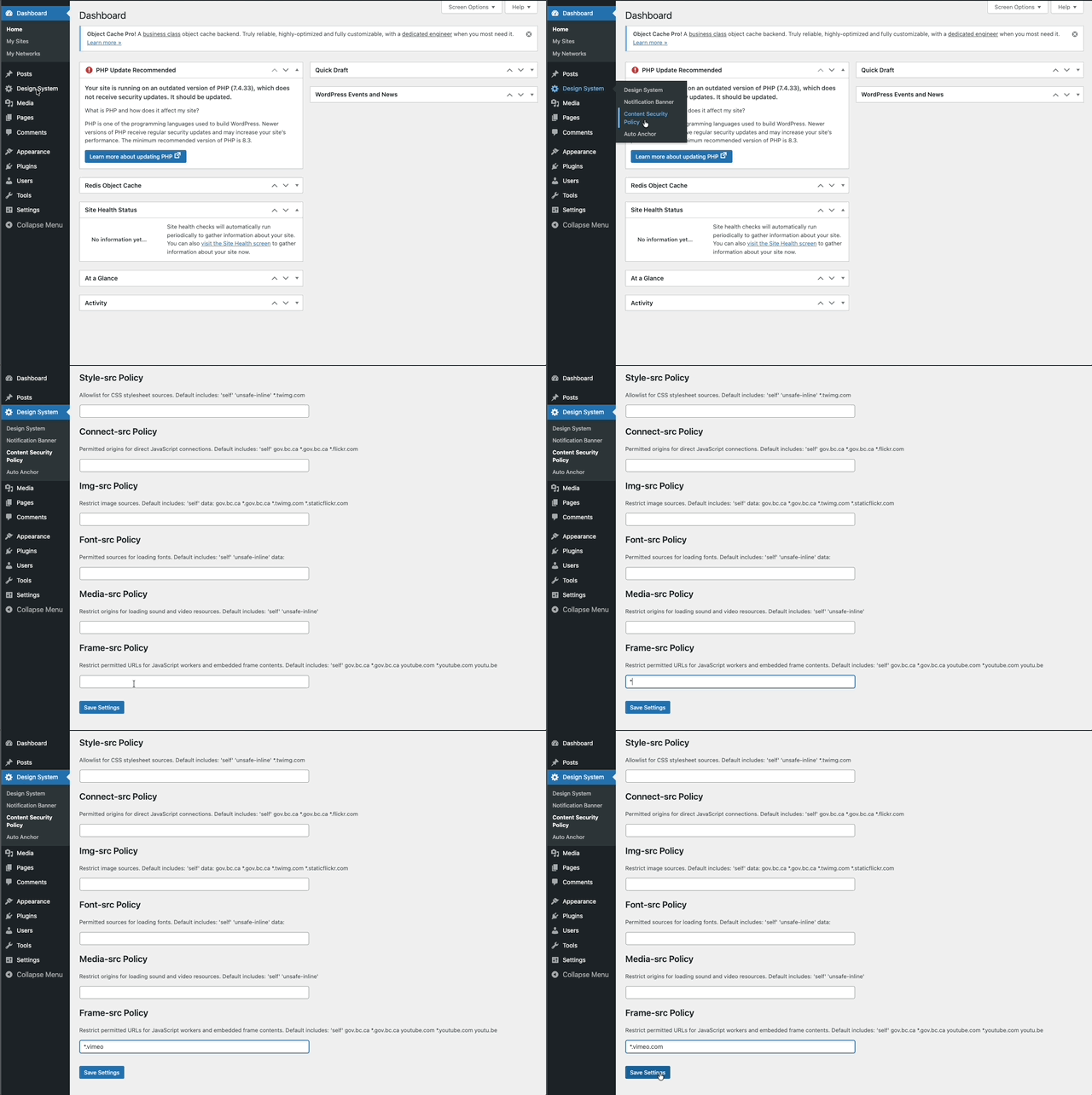
How the form works
- Each field accepts a space‑separated allowlist of sources (no commas).
- If a field is left empty, the plugin uses its built‑in defaults (shown as helper text under each label).
- You can add:
- Keywords:
'self''none''unsafe-inline''unsafe-eval'data:blob:https: - Hosts:
example.comsub.example.com - Wildcards:
*.example.com
- Keywords:
- Use the least‑privilege set you can. Prefer HTTPS. Avoid
'unsafe-inline'and'unsafe-eval'when possible.
Tip: To revert a directive to defaults, clear the field and Save Settings. To block a type entirely, enter 'none'.
Directive reference
Below is what each field controls and examples of what you might add. The defaults shown in the UI include the design system’s domains (e.g., gov.bc.ca, twimg.com, flickr domains, and YouTube for embeds).
Default-src Policy
- Fallback for all resource types without an explicit directive.
- Keep minimal. Add broad hosts here only if you can’t scope them to a more specific directive.
Example additions:
https: cdn.example.com
Script-src Policy
- JavaScript files and inline JS.
- Prefer hosted files over inline scripts. Remove 'unsafe-inline'/'unsafe-eval' if your site doesn’t require them.
Example additions:
cdn.jsdelivr.net cdn.skypack.dev www.googletagmanager.com www.google-analytics.com
Style-src Policy
- CSS files and inline styles.
- If you must allow inline styles, keep 'unsafe-inline'. Consider using hashed inline styles instead of broad allowance.
Example additions:
fonts.googleapis.com cdn.jsdelivr.net
Connect-src Policy
- Fetch/XHR, WebSocket, EventSource, analytics beacons, and GraphQL endpoints.
Example additions:
api.example.com *.sentry.io
Img-src Policy
- Images and favicons. data: allows inline base64 images.
Example additions:
i.ytimg.com cdn.example.com data:
Font-src Policy
- Font files (woff, woff2, ttf). data: enables embedded fonts like
data:font/woff2;base64,d09GMgABAAAAAA...')
Example additions:
fonts.gstatic.com data:
Media-src Policy
- Audio and video files (not iframes).
Example additions:
media.example.com
Frame-src Policy
- Origins allowed in iframes (and workers for some browsers).
Example additions:
*.youtube.com youtu.be *.vimeo.com *.rumble.com
Common recipes
Google Fonts
- style-src:
fonts.googleapis.com - font-src:
fonts.gstatic.com data:
- style-src:
YouTube/Vimeo embeds
- frame-src:
*.youtube.com youtu.be *.vimeo.com - img-src:
i.ytimg.com(for thumbnails)
- frame-src:
Mapbox
- script-src:
api.mapbox.com - style-src:
api.mapbox.com - img-src:
api.mapbox.com - connect-src:
events.mapbox.com
- script-src:
Generic CDN
- Add the CDN host to the specific directive you need (script-src, style-src, img-src, etc.), e.g.,
cdn.example.com
- Add the CDN host to the specific directive you need (script-src, style-src, img-src, etc.), e.g.,
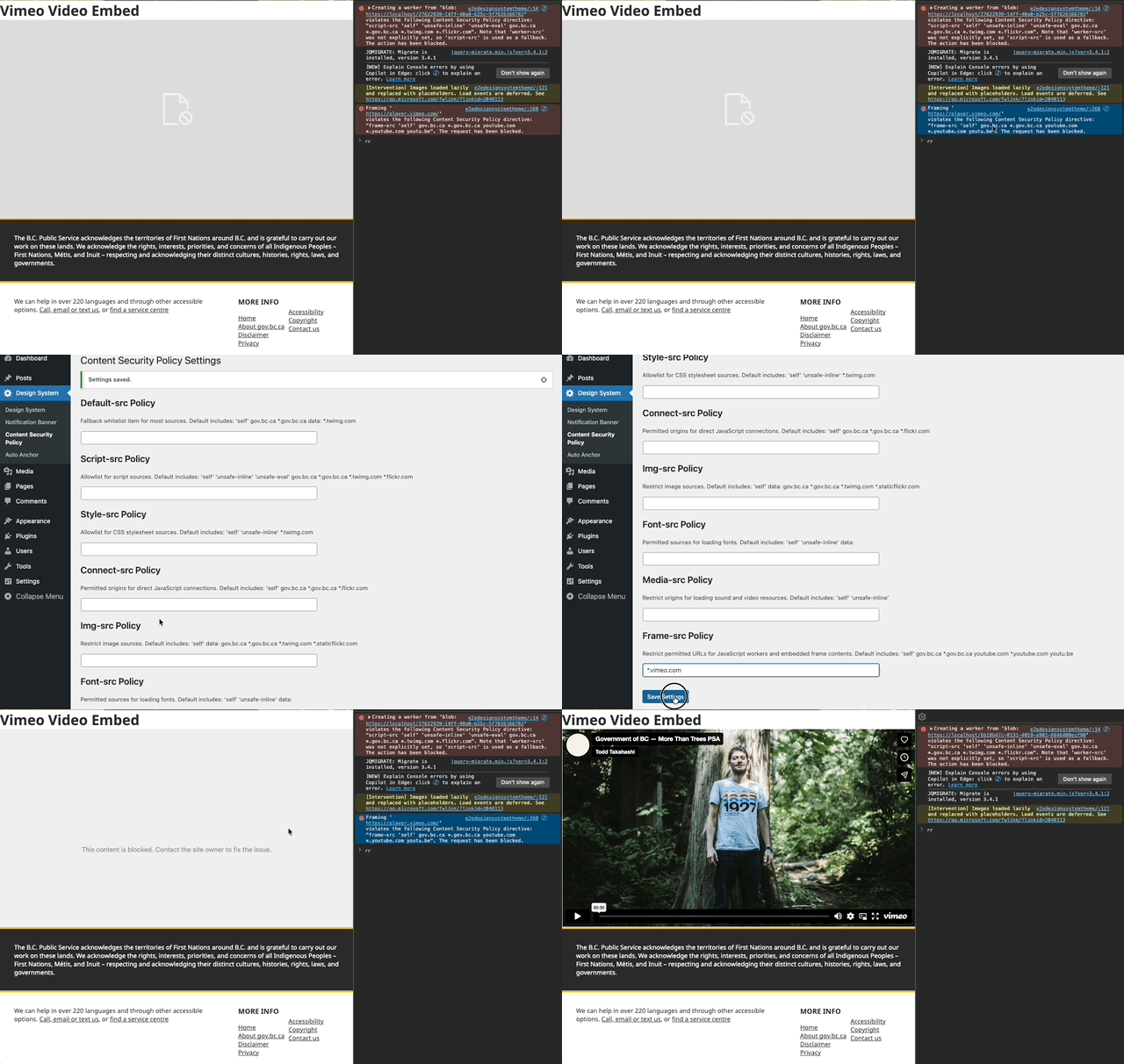
Testing changes
- Save Settings.
- Hard‑refresh the page in your browser (Shift+Reload).
- Open DevTools → Console. Look for “Refused to connect/script/style from … because it violates the Content Security Policy”.
- Add the blocked origin to the correct directive and save again.
- Repeat until violations are gone.
Tip: If something still doesn’t load, verify the exact hostname in the violation message and add that host (or a wildcard like *.example.com) to the correct directive.
FAQ
How do I reset to defaults?
- Clear the field and click Save Settings.
Can I disable a resource type completely?
- Enter 'none' in that directive and save.
Do I need commas?
- No. Use spaces between entries.