
Passwordless GitHub-to-Azure Sign-In Setup
This guide explains how to set up passwordless sign-in between GitHub Actions and Azure by using OpenID Connect. In plain terms, this lets a workflow ask Azure for a short-lived token at runtime instead of storing a long-lived secret in the repository.
Why use OpenID Connect? There are no stored deployment secrets to rotate, no long-lived credentials sitting in GitHub, and the tokens expire automatically.
How It Works
Trust Chain
- GitHub signs tokens with its private key for each workflow run
- Azure validates the token signature using GitHub's public key
- Subject claim matching ensures only the specified repo/environment gets access
- Bearer token issued by Azure for actual resource access
Prerequisites
- Azure CLI installed and logged in (
az login) - Terraform installed
- GitHub CLI (optional, for auto-creating secrets)
- Owner access to Azure security group
Setup Script: initial-azure-setup.sh
This script configures everything needed for OpenID Connect authentication. Run it once per environment.
Usage
./initial-setup/initial-azure-setup.sh \
    -g "RESOURCE-GROUP-NAME" \
    -n "identity-name" \
    -r "owner/repo" \
    -e "environment" \
    -s "subscription-id" \
    --create-storage \
    --create-github-secrets
Parameters
| Parameter | Description | Required |
|---|---|---|
-g |
Azure resource group name | Yes |
-n |
Managed identity name | Yes |
-r |
GitHub repository (owner/repo) | Yes |
-e |
Environment name (dev, test, prod) | Yes |
-s |
Azure subscription ID | No (uses current) |
--create-storage |
Create storage account for Terraform state | No |
--create-github-secrets |
Automatically create GitHub environment secrets | No |
What Gets Created
Managed Identity
Azure service account for your pipeline to authenticate as.
Federated Credential
Trust link between your GitHub repo/environment and the Azure identity.
Storage Account
For Terraform state files (with --create-storage).
Environment Examples
Dev Environment
./initial-azure-setup.sh \
    -g "ABCD-dev-networking" \
    -n "myapp-dev-identity" \
    -r "bcgov/myapp" \
    -e "dev" \
    --create-storage \
    --create-github-secrets
Creates:
- Identity:
myapp-dev-identity - Storage:
tfdevmyapp - Subject:
repo:bcgov/myapp:environment:dev
Prod Environment
./initial-azure-setup.sh \
    -g "ABCD-prod-networking" \
    -n "myapp-prod-identity" \
    -r "bcgov/myapp" \
    -e "prod" \
    --create-storage \
    --create-github-secrets
Creates:
- Identity:
myapp-prod-identity - Storage:
tfprodmyapp - Subject:
repo:bcgov/myapp:environment:prod
Important: Dev and Prod are completely isolated — different subscriptions, different identities, different permissions. A dev pipeline cannot access prod resources.
Token Lifecycle
| Token Type | TTL | Notes |
|---|---|---|
| GitHub OIDC Token | ~5 minutes | Generated fresh each workflow run, only used to get Azure token |
| Azure Bearer Token | 1 hour (3600s) | Auto-refreshed by azure/login action if job runs longer |
Troubleshooting
Common Issues
| Error | Solution |
|---|---|
AADSTS700024: Subject mismatch |
environment: in workflow must match -e flag used in setup |
| OIDC token not generated | Add permissions: id-token: write to workflow |
| 403 Forbidden on terraform apply | Identity not in security group, or wrong subscription |
| State file access denied | Add use_azuread_auth = true in backend config |
Full Architecture Diagram
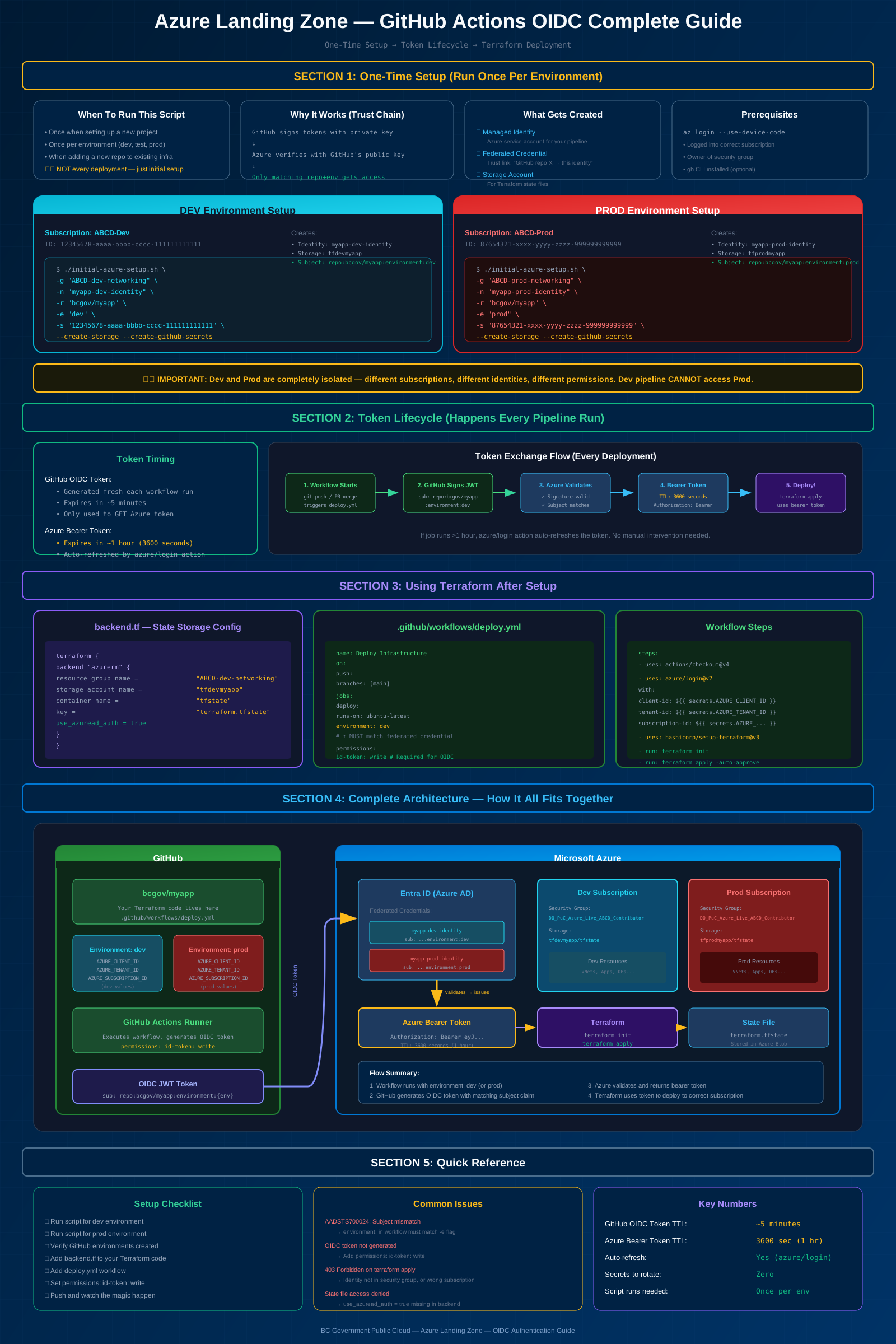
Click to view full size