
Cost Tracking
This page is still being refined. The cost tracking design and chargeback process are not fully finalised yet. See the cost allocation decision record for the current direction.
This page explains how platform costs are tracked, how shared costs are split across teams, and which parts of the design are still being worked out. It is written for readers who want to understand the operating model before they dive into detailed formulas and example queries.
Architecture
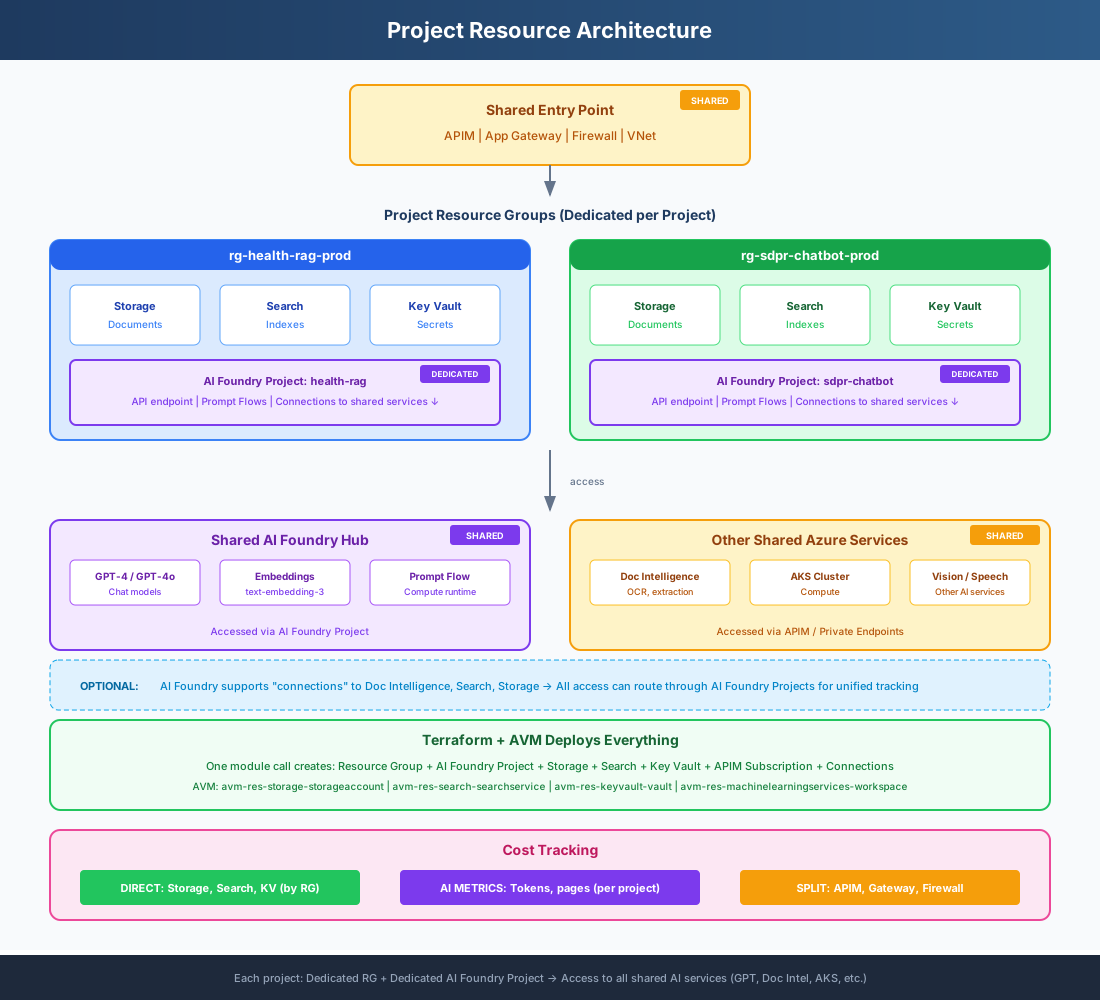
What Each Project Gets
| Resource | Type | Description |
|---|---|---|
| Resource Group | Dedicated | rg-{project}-{env} - contains all project resources |
| Storage Account | Dedicated | Project documents and data |
| Search Service | Dedicated | Project indexes for RAG |
| Key Vault | Dedicated | Project secrets and keys |
| AI Foundry Project | Dedicated | Project's own API endpoint, prompt flows, index (within shared Hub) |
| APIM Subscription | Dedicated | Project's API key for access |
| AI Models (GPT-4, etc.) | Shared | Deployed once in Hub, accessed via AI Foundry Project |
| APIM, App Gateway, Firewall | Shared | Entry point infrastructure |
| Azure Bastion + jumpbox | Shared | Standard SKU Bastion + jumpbox VM for CI/CD private-endpoint access (auto-deleted off-hours to save cost) |
| CI/CD Runners (GitHub self-hosted) Optional | Optional | Container Apps job + ACR + Log Analytics — provisioned only when github_runners_aca_enabled = true; not used by this platform’s own CI/CD |
Terraform Deploys Everything
Tenant stacks are deployed with deploy-scaled.sh which runs Terraform across five isolated state files. Resource AVM modules are used where available; raw Terraform resources are used when an AVM module does not exist.
# deploy-scaled.sh executes 3 phases:
# Phase 1: shared foundation (network, KV, AppGW, WAF)
# Phase 2: per-tenant stacks (parallel, isolated state)
# Phase 3: foundry + apim + tenant-user-mgmt
#
# Each stack corresponds to an infra-ai-hub/stacks/* directory.
AVM Modules Used
| Resource | AVM Module |
|---|---|
| Storage Account | avm-res-storage-storageaccount |
| Search Service | avm-res-search-searchservice |
| Key Vault | avm-res-keyvault-vault |
| AI Foundry Hub | avm-res-machinelearningservices-workspace |
| API Management | avm-res-apimanagement-service |
| Application Gateway | avm-res-network-applicationgateway |
| Virtual Network | avm-res-network-virtualnetwork |
How Cost Tracking Works
Direct Costs
Storage, Search, Key Vault
Tracked automatically by Azure Cost Management using Resource Group tags.
~40% of total
AI Usage
Tokens, API calls
Tracked by AI Foundry per project. Each AI Foundry Project has its own metrics.
~45% of total
Platform Split
APIM, Gateway, Firewall
Split evenly across all projects (shared infrastructure).
~15% of total
CI/CD Runner Costs (Self-hosted GitHub runners)
The optional github_runners_aca module provisions self-hosted runners inside the VNet for tenant CI/CD pipelines that need private endpoint access. Runners run as Azure Container Apps jobs (scale-to-zero) with supporting services (ACR + Log Analytics). Note: this repo's own CI/CD uses public GitHub runners + the Bastion tunnel instead.
Cost Drivers
- Runner compute: Container Apps job runtime (primary driver; usage-based)
- Concurrency cap:
max_runners(default 4) - Sizing:
container_cpu(default 1 vCPU) andcontainer_memory(default 2Gi) - Logs: Log Analytics ingestion (GB/month)
- Images: ACR Premium base cost (fixed) + storage/transfer (Premium is required for Private Link / private endpoints)
Sample Calculation (module defaults)
Assumptions: 20 jobs/day, 10 min/job, avg concurrency = 1.5
Monthly runner hours = 30 * 20 * (10/60) * 1.5 = 150 hours
    Total seconds = 150 * 3600 = 540,000 seconds

    Canada Central rates (Container Apps):
    vCPU-seconds: $0.0000480/sec
    GiB-seconds:  $0.0000057/sec
    Requests:     $0.565 per million

    vCPU cost = 540,000 * 1 vCPU * 0.0000480 = $25.92
    Memory cost = 540,000 * 2 GiB * 0.0000057 = $6.16
    Request cost (example 1M req/mo) = $0.57

    Estimated runner compute total ≈ $32.65/mo

    ACR Premium base cost = $2.351/day ≈ $70.53/mo (30-day month)
    Estimated compute + ACR base ≈ $103.18/mo
Assumes a single-region ACR Premium registry with no geo-replication and no connected registry. Add Log Analytics ingestion (GB/month) and any ACR transfer/storage beyond the included 500 GB for a full estimate.
Example Monthly Costs
Health-RAG Project
| Storage + Search + KV | $420 | DIRECT |
| AI usage (60% of tokens) | $1,020 | AI |
| Platform share (50%) | $300 | SPLIT |
| Total | $1,740 |
SDPR-Chatbot Project
| Storage + Search + KV | $350 | DIRECT |
| AI usage (40% of tokens) | $680 | AI |
| Platform share (50%) | $300 | SPLIT |
| Total | $1,330 |
Usage Monitoring, Cost Allocation, and Chargeback Metrics
Introduction
This document defines the approach for implementing Usage Monitoring, Cost Allocation, and Chargeback Metrics for the BC Government AI Services Hub multi-tenant platform. These three interconnected capabilities are essential for operating a shared AI infrastructure that serves multiple ministries while maintaining cost transparency and accountability.
Key Concepts
Usage Monitoring tracks resource consumption at the tenant level to support both cost allocation and operational insights. For the AI Services Hub, monitoring serves two purposes: capturing metrics for shared infrastructure allocation (APIM, App Gateway) and providing operational visibility into service usage patterns.
Cost Allocation combines Azure's native cost tracking with custom calculations for shared resources. The hub architecture uses two allocation models: direct attribution for tenant-dedicated resources (AI Foundry projects with their own Azure OpenAI, Cosmos DB, and AI Search; dedicated Document Intelligence instances), and proportional allocation for shared infrastructure (APIM, App Gateway, monitoring services) where costs are split based on actual usage percentages.
Chargeback Metrics aggregate all cost components—direct resource costs from Azure billing and allocated shared infrastructure costs—into consolidated monthly invoices per tenant.
Document Scope
This document covers:
- Tagging strategies for both dedicated and shared resources across the dual-region deployment (Canada Central/East)
- Usage tracking pipelines using APIM, Event Hubs, and Azure Functions to capture metrics for shared infrastructure allocation
- Cost calculation methods combining Azure Cost Management (for direct attribution) with custom allocation logic (for shared infrastructure)
- Implementation patterns with code examples for usage tracking, cost allocation functions, and Kusto queries for chargeback reporting
- Network egress tracking to handle cross-region costs between Canada Central (APIM/App Gateway) and Canada East (AI Foundry)
The approach leverages APIM as the central governance point where all AI requests flow—regardless of whether backend services are inside the Foundry landing zone (OpenAI, AI Search) or outside it (Document Intelligence). APIM routing policies direct each tenant to their appropriate backend resources, enabling consistent tenant identification for shared infrastructure cost allocation.
Usage Monitoring Metrics
Azure API Management (APIM) provides centralized monitoring as all AI requests flow through the gateway. Monitoring serves two distinct purposes: tracking metrics for shared infrastructure allocation and providing operational insights.
Metrics for Shared Infrastructure Allocation
These metrics are used to proportionally split shared infrastructure costs (APIM, App Gateway, networking):
- API call volume: Request count per tenant—used to allocate APIM and App Gateway costs
- Network egress bytes: Response payload size per tenant—used to allocate cross-region data transfer costs
- Log ingestion (GB): Application Insights data volume per tenant—used to allocate monitoring costs
Operational Metrics (Not for Chargeback)
These metrics support capacity planning, SLA monitoring, and performance optimization:
- Token consumption breakdown: Which models each tenant uses and token volume (for capacity planning)
- Document Intelligence pages: Pages processed per tenant (for capacity planning)
- Query latency: Response times per service/tenant
- Error rates: Failed requests for support escalation
- Concurrent connections: Active sessions per tenant
Monitoring Architecture
- APIM logs requests/responses with tenant-id to Azure Event Hubs
- Azure Functions process Event Hub messages to:
- Count API calls per tenant (for APIM/Gateway allocation)
- Sum network egress bytes per tenant (for data transfer allocation)
- Extract operational metrics (tokens, pages, latency)
- Results stored in Log Analytics:
- Allocation metrics used in monthly shared cost calculations
- Operational metrics used for dashboards and SLA reporting
Resource Tagging and Cost Allocation
AI Foundry Projects (Direct Attribution)
Each tenant receives a dedicated Foundry project with isolated resources. Azure automatically bills all consumption (Azure OpenAI tokens, Cosmos DB, AI Search) to the project.
Tagging strategy:
Project: "tenant-wlrs-water-permits"
Tags:
- tenant-id: "wlrs"
- cost-center: "CC-NRM-WLRS"
- department: "Natural-Resources"
- environment: "production"
- service-tier: "standard"
Cost allocation: Direct attribution via Azure Cost Management tag filtering. Query Tags["tenant-id"] == "wlrs" shows all Foundry project costs including:
- Azure OpenAI token consumption (all models, prompt/completion/safety tokens)
- Cosmos DB storage and operations
- AI Search queries and indexing
- Foundry artifact storage
No manual calculation needed—Azure bills these resources directly to each project.
Document Intelligence (Direct Attribution)
Architectural Decision: Deploy one dedicated Document Intelligence resource per tenant
Rationale:
- Simplified cost allocation: Direct attribution via tags, no proportional calculation needed
- Performance isolation: No "noisy neighbor" concerns with dedicated resources
- Compliance: Easier to meet ministry-specific data residency requirements
- Scaling: Each tenant can independently scale their DI instance
Resources:
docint-wlrs(Canada Central)docint-sdpr(Canada Central)
Tags (on each DI resource):
Tags:
- tenant-id: "wlrs" OR "sdpr"
- shared-service: "no"
- resource-type: "document-intelligence"
- managed-by: "ai-services-hub"
Cost allocation: Direct attribution via Azure Cost Management tag filtering. Azure Cost Management query: Tags["tenant-id"] == "wlrs" shows WLRS's DI costs (page processing charges) directly.
Usage tracking (for operational metrics only):
- APIM logs pages processed per tenant to Event Hubs
- Used for: capacity planning, SLA monitoring, usage trends
- NOT used for cost allocation (costs already directly attributed via tags)
Implementation:
- Deploy DI resources in same subscription as AI Services Hub
- Configure APIM backends pointing to each DI instance
- Use APIM
set-backend-servicepolicy for tenant routing
Infrastructure and Platform Costs (Proportional Allocation)
These shared resources serve all tenants and require proportional cost allocation based on usage metrics.
App Gateway/WAF
Tags:
Tags:
- shared-service: "yes"
- resource-type: "app-gateway-waf-v2"
- allocation-method: "request-count-proportional"
Cost structure:
- Fixed: ~$323/month (split equally across active tenants)
- Variable: Allocated by capacity units consumed
Allocation method: Proportional based on request count from App Gateway access logs
APIM V2
Tags:
Tags:
- shared-service: "yes"
- allocation-method: "api-call-proportional"
Cost structure: $1,000-2,000/month depending on tier
Allocation method: Based on API call volume per tenant from Event Hubs
AI Foundry Hub Dependencies
Storage Account (Foundry hub-level):
- Shared storage account for Foundry hub artifacts, flows, evaluations
- Tags:
foundry-dependency: "hub-storage"allocated-to: "all-projects"
- Allocation method: Split equally across active projects OR by storage consumption if measurable
- Note: Individual project storage is billed directly to each project (direct attribution)
Application Insights/Log Analytics:
- Required for Foundry monitoring
- Cost based on data ingestion volume (GB)
- Tags:
monitoring-service: "foundry"allocation-method: "proportional"
- Allocation method: By log volume per project (if tenant-id in logs)
Key Vault:
- Stores connection strings for each project
- Transaction-based pricing (~$0.03/10k transactions)
- Tags:
foundry-dependency: "secrets"shared-service: "yes"
- Allocation method: By transaction count per project (minimal cost impact)
Network Egress
Cost structure:
- First 100 GB/month free per region
- Then tiered pricing: $0.087/GB (next 10 TB), $0.067/GB (next 40 TB), etc.
Risk in dual-region setup: Cross-region traffic between Canada East (Foundry) and Canada Central (APIM) incurs egress charges
Tags:
Tags:
- traffic-source: "canada-east-foundry"
- traffic-destination: "canada-central-apim"
- allocation-method: "tenant-response-bytes"
Tracking mechanism: App Gateway diagnostic logs (not Azure Cost Management tags)
Note: Egress is billed at subscription level, requires custom calculation from logs (see implementation section below)
Regional Cost Tracking
The dual-region deployment (Canada Central for APIM/App Gateway, Canada East for Foundry) requires regional cost tracking.
All resources must include:
Tags:
- deployment-region: "canada-central" OR "canada-east"
- primary-region: "canada-central"
Why this matters:
- Pricing variations: Some Azure services have different pricing between Canada Central and Canada East
- Cross-region attribution: When WLRS uses Foundry in Canada East but APIM in Canada Central, costs must be attributed correctly
- Egress tracking: Cross-region traffic needs regional source/destination tags
Chargeback Metrics Summary
Monthly tenant invoices combine two cost categories:
Direct Costs (Azure-Billed, No Calculation Needed)
Retrieved via Azure Cost Management tag filtering (tenant-id):
- AI Foundry project costs: All Azure OpenAI consumption (tokens), Cosmos DB, AI Search, project storage
- Document Intelligence costs: Page processing charges for dedicated DI instance
- Foundry compute costs: Any custom agent execution resources (if applicable)
Allocated Costs (Calculated from Usage Metrics)
Proportionally split based on tenant usage:
- APIM costs: Split by API call volume per tenant
- App Gateway costs: Split by request count per tenant
- Network egress costs: Split by response bytes per tenant
- Application Insights costs: Split by log ingestion volume per tenant
- Shared storage costs: Split equally or by consumption across Foundry projects
Implementation: Cost Calculation Methods
Method 1: Azure Cost Management (Built-in, No Code)
Azure Cost Management handles all direct attribution automatically. No custom code needed for tenant-dedicated resources.
Step 1: Enable Tag Inheritance
Azure Portal → Cost Management → Settings → Configuration
→ Enable "Automatically apply subscription and resource group tags to new data"
This propagates tags from subscriptions/resource groups down to individual usage records.
Step 2: View Direct Attribution Costs
Cost Analysis → Add Filter → Tag
→ Select "tenant-id" → Choose "wlrs"
This shows all costs where tenant-id = wlrs, including:
- Foundry project (Azure OpenAI tokens, Cosmos DB, AI Search, storage)
- Document Intelligence (page processing)
- Any other dedicated resources
This is direct attribution—Azure calculates it automatically based on actual consumption.
Step 3: Create Cost Allocation Rules for Shared Resources
This is where shared infrastructure costs (APIM, App Gateway) get split:
Cost Management → Cost Allocation Rules → Add Rule

SOURCE (what to split):
- Resource Group: "rg-ai-hub-shared-infra"
- Tag filter: shared-service = "yes"

TARGETS (who receives the split):
- Tag: tenant-id = "wlrs"
- Tag: tenant-id = "sdpr"
- Tag: tenant-id = "other-ministry"

ALLOCATION METHOD:
Option A: "Distribute evenly" → Each tenant gets 33.33%
Option B: "Total cost proportional" → Split based on each tenant's existing costs
Option C: "Custom percentage" → Manually set: WLRS 45%, SDPR 30%, Others 25%
Limitation: The "proportional" options only work based on existing Azure costs, not custom metrics like "API call count". For usage-based allocation, use Method 2 below.
Result: Monthly report showing allocated costs per tenant:
- WLRS: $5,230 (includes $675 allocated from shared APIM)
- SDPR: $3,100 (includes $450 allocated from shared APIM)
Method 2: Custom Calculation (Usage-Based Allocation)
For proportional allocation based on usage metrics (API calls, egress bytes), custom code is required.
Architecture
Event Hubs (usage data)
→ Azure Function (calculate percentages)
→ Log Analytics (store allocation data)
→ Power BI/Cost Dashboard (reporting)
Step 1: Calculate Tenant Usage Percentages
Azure Function runs monthly (triggered by timer):
# Pseudo-code for monthly allocation calculation
import kusto_client

# Query Event Hub processed data for API call counts
query = """
customEvents
| where timestamp >= startofmonth(now()) and timestamp < startofmonth(now(), 1)
| where name == "APIM-Request-Log"
| summarize RequestCount = count() by TenantId
"""

results = kusto_client.execute(query)
# Results: {"wlrs": 45000, "sdpr": 30000, "others": 25000}

total_requests = sum(results.values())  # 100,000

# Calculate percentages for shared infrastructure allocation
allocations = {
tenant: (count / total_requests) * 100
for tenant, count in results.items()
}
# Result: {"wlrs": 45%, "sdpr": 30%, "others": 25%}
Step 2: Query Azure Cost Management API for Shared Resource Costs
from azure.mgmt.costmanagement import CostManagementClient

# Get actual costs for shared resources
cost_query = {
"type": "ActualCost",
"timeframe": "MonthToDate",
"filter": {
    "tags": {
        "name": "shared-service",
        "operator": "In",
        "values": ["yes"]
    }
}
}

shared_costs = cost_client.query(scope, cost_query)
# Result: APIM = $1,500, App Gateway = $400, Total = $1,900
Step 3: Apply Allocation Percentages
# Calculate each tenant's share of shared infrastructure
apim_cost = 1500
app_gateway_cost = 400

tenant_allocations = {
"wlrs": {
    "apim": apim_cost * 0.45,           # $675
    "gateway": app_gateway_cost * 0.45, # $180
    "total_shared": 855
},
"sdpr": {
    "apim": apim_cost * 0.30,           # $450
    "gateway": app_gateway_cost * 0.30, # $120
    "total_shared": 570
},
"others": {
    "apim": apim_cost * 0.25,           # $375
    "gateway": app_gateway_cost * 0.25, # $100
    "total_shared": 475
}
}
Step 4: Write Allocation Results to Log Analytics
# Store calculated allocations for reporting
log_analytics_client.post(
workspace_id,
log_type="SharedCostAllocation",
json=[
    {
        "Month": "2026-01",
        "TenantId": "wlrs",
        "APIManagement": 675,
        "AppGateway": 180,
        "NetworkEgress": 0,  # Calculated separately in Step 5
        "TotalSharedCost": 855,
        "AllocationMethod": "api-call-proportional"
    },
    # ... repeat for other tenants
]
)
Step 5: Calculate Network Egress Costs
Network egress is billed at the subscription level and requires custom calculation from diagnostic logs.
Enable Network Diagnostics:
App Gateway → Diagnostic Settings → Send to Log Analytics
→ Enable "Access Logs" (contains bytes sent per request)
Query Logs to Calculate Per-Tenant Egress:
AzureDiagnostics
| where ResourceType == "APPLICATIONGATEWAYS"
| where Category == "ApplicationGatewayAccessLog"
| extend TenantId = extract("tenant=([^&]+)", 1, requestUri_s) // Parse from URL
| summarize TotalEgressGB = sum(sentBytes_d) / 1073741824 by TenantId
| extend EgressCost = case(
TotalEgressGB <= 100, 0,  # First 100 GB free
TotalEgressGB <= 10240, (TotalEgressGB - 100) * 0.087,  # $0.087/GB
TotalEgressGB > 10240, (10140 * 0.087) + ((TotalEgressGB - 10240) * 0.067)  # Tiered
)
Write these egress costs to the `SharedCostAllocation` table alongside other shared infrastructure costs.
Step 6: Combine All Costs in Final Chargeback Report
Monthly Kusto query for chargeback:
// Direct costs from Azure Cost Management (Foundry projects, DI instances)
let DirectCosts = AzureCosts
| where Tags["tenant-id"] != ""
| summarize DirectCost = sum(Cost) by TenantId = Tags["tenant-id"];

// Allocated shared infrastructure costs from custom calculation
let AllocatedCosts = SharedCostAllocation_CL
| where Month == startofmonth(now())
| summarize AllocatedCost = sum(TotalSharedCost) by TenantId;

// Final chargeback report
DirectCosts
| join kind=leftouter AllocatedCosts on TenantId
| extend TotalChargeback = DirectCost + AllocatedCost
| project TenantId, DirectCost, AllocatedCost, TotalChargeback
Output:
| TenantId | DirectCost | AllocatedCost | TotalChargeback |
|---|---|---|---|
| wlrs | $4,200 | $855 | $5,055 |
| sdpr | $2,400 | $570 | $2,970 |
Note: DirectCost includes all Azure OpenAI token consumption, Document Intelligence page processing, Cosmos DB, AI Search, and storage—automatically calculated by Azure based on actual usage.
Summary
This document establishes a comprehensive cost tracking framework for the AI Services Hub using:
- Direct attribution for tenant-dedicated resources (Foundry projects with Azure OpenAI/Cosmos/AI Search, Document Intelligence instances)—Azure automatically bills these based on actual consumption
- Proportional allocation for shared infrastructure (APIM, App Gateway, monitoring)—custom calculations split costs based on API call volume and network usage
- Minimal custom tracking via Event Hubs and Azure Functions—only needed for shared infrastructure allocation, not for AI service consumption
- Dual calculation methods: Azure Cost Management for tag-based direct attribution (90% of costs), and custom code for usage-based shared infrastructure allocation (10% of costs)
The implementation provides full cost transparency while minimizing operational overhead—most costs are automatically tracked by Azure, with custom calculations only for shared platform services.