Client Types
When requesting a new client in the CSS, you can choose from two supported client types:
- Confidential client
- Public Client
Confidential Client
A confidential client is intended for applications that have a secure back-end server capable of storing credentials safely — such as traditional web applications, APIs, or server-side services.
With this client type, a client secret is issued alongside the client ID. The back-end component stores this secret securely and uses it during the token exchange step of the Authorization Code Flow: after Keycloak redirects the user back with an authorization code, the server sends the code along with the client secret to Keycloak's token endpoint to receive the access token, ID token, and refresh token.
Because the client secret never leaves the server and is never exposed to the browser or end user, confidential clients provide a strong level of security. This makes them the preferred choice when your application architecture includes a server-side component.
When to use a confidential client:
- Traditional server-rendered web applications (e.g., Java, .NET, Node.js with a back end)
- Back-end APIs that need to authenticate on behalf of users
- Any application where secrets can be stored outside of the browser or a mobile device
Key properties:
- Requires a
client_idandclient_secretfor token exchange - Client secret is available through the CSS after provisioning
- Supports refresh tokens for long-lived sessions
- Not suitable for single-page applications (SPAs) or native mobile apps, where secrets cannot be stored securely
Public Client
A public client does not use a client secret. This is not a limitation of the platform — it is a deliberate design choice for application architectures where secrets cannot be stored securely, such as single-page applications (SPAs) running entirely in the browser, or native mobile apps installed on a user's device. In these environments, any value embedded in the application code or stored on the device must be considered compromised, since it can be extracted by an attacker.
Because there is no client secret to authenticate the application during the token exchange, public clients rely on other mechanisms to maintain security. The primary mechanism supported by Keycloak is PKCE (Proof Key for Code Exchange), which replaces the static client secret with a dynamically generated, per-request proof that binds the authorization code to the client that initiated the flow.
When to use a public client:
- Single-page applications (SPAs) built with frameworks like React, Angular, or Vue
- Native mobile applications (iOS, Android, React Native, Flutter)
- Desktop applications where secure secret storage is not feasible
- Any application that runs entirely on the end user's device or browser
Key properties:
- Only requires a
client_id— no client secret is issued or needed - Must use PKCE to protect the Authorization Code Flow
- Redirect URIs must be precisely configured to prevent authorization code interception
- The Implicit Flow (which bypasses the code exchange entirely) must not be used — it is deprecated and insecure
Proof Key for Code Exchange (PKCE)
The Keycloak JavaScript adapter includes built‑in support for PKCE. When using the adapter, enable PKCE during initialization by setting the pkceMethod option.
Example:
keycloak.init({ pkceMethod: 'S256' });
If you are not using the Keycloak adapter, you may implement PKCE manually. A custom PKCE flow requires the following steps:
- Create a
code_verifier(cryptographically secure string) - Hash the code_verifier with the SHA-256 method to create a
code_challenge - Send the code_challenge and code challenge method (S256) as query parameters when redirecting users to the authorization endpoint.
- When exchanging the received code for an access token, send the initial
code_verifierto prove that your application initiated the flow.
For a detailed implementation walkthrough, see this example.
Why Choose PKCE Over the Implicit Flow?
The Implicit Flow was originally designed for browser-based applications as a simpler alternative to the Authorization Code Flow. Instead of exchanging an authorization code for tokens, it returns tokens directly in the URL fragment after the user authenticates. While this reduced round-trips, it introduced significant security problems:
- Tokens are exposed in the browser: Because tokens appear in the URL fragment, they can be leaked through browser history, server logs, referrer headers, and JavaScript running on the same page.
- No sender binding: There is no way to verify that the token was issued to the application that requested it — any script with access to the URL can capture and misuse it.
- No refresh tokens: The Implicit Flow does not support refresh tokens, forcing users to re-authenticate frequently or requiring silent re-authentication via hidden iframes — an approach that is increasingly blocked by modern browsers due to privacy restrictions (e.g., third-party cookie blocking)
PKCE addresses all of these issues while keeping the flow accessible for public clients:
- Tokens are never returned in the URL — only a short-lived authorization code is, and it is useless without the corresponding
code_verifier - The
code_verifier/code_challengepair acts as a dynamic, per-request proof of identity that an attacker cannot forge, even if they intercept the authorization code - PKCE fully supports refresh tokens, enabling long-lived sessions without re-authentication
The Implicit Flow is formally deprecated by OAuth 2.0 Security Best Current Practice (RFC 9700) and must not be used for new integrations. If your application currently uses the Implicit Flow, migrating to Authorization Code Flow with PKCE is strongly recommended and should be treated as a security remediation
Navigate to OIDC & PKCE for more information
Summary
The diagram below can help you determine which client type is right for your application. Use it as a guide based on your application's architecture and security requirements.
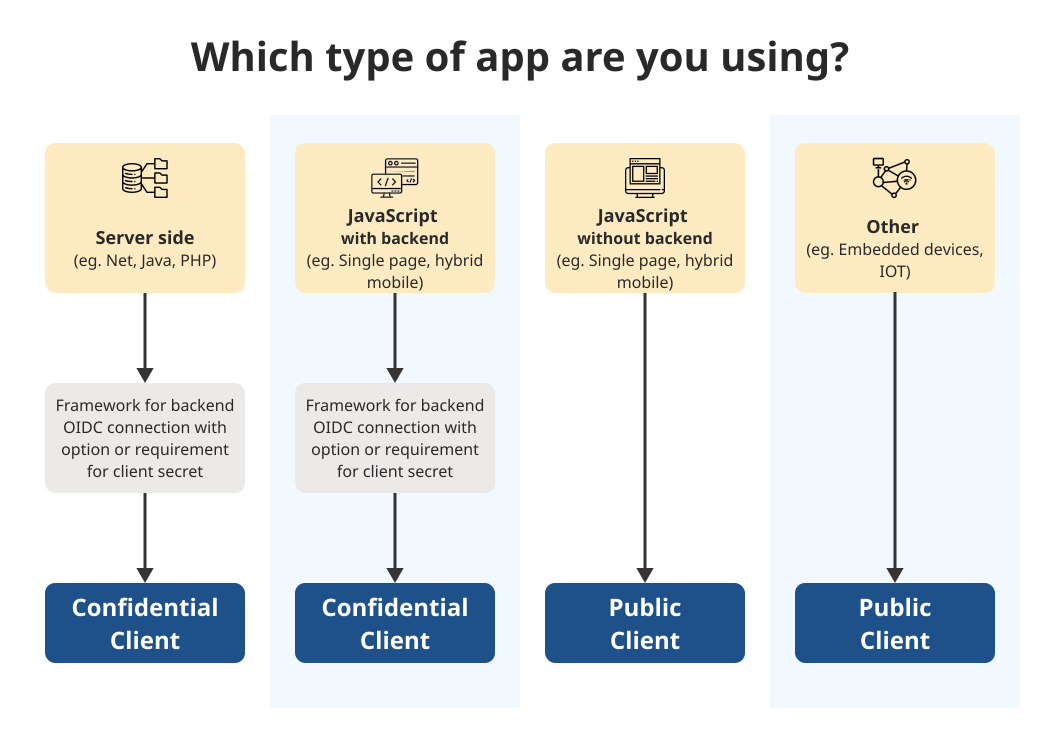
If you are still unsure which client type to choose, or if your use case does not fit neatly into either category, reach out to the SSO team for guidance. We can help assess your application's needs and recommend the most appropriate configuration