
Architecture Diagrams
Interactive diagrams showing the system architecture, document ingestion flow, deployment topology, and temporal worker internals. Click any diagram to view it in the interactive viewer with zoom and pan controls.
Select a Diagram

System Overview
High-level view of all platform components: frontend, backend services, Temporal, and storage
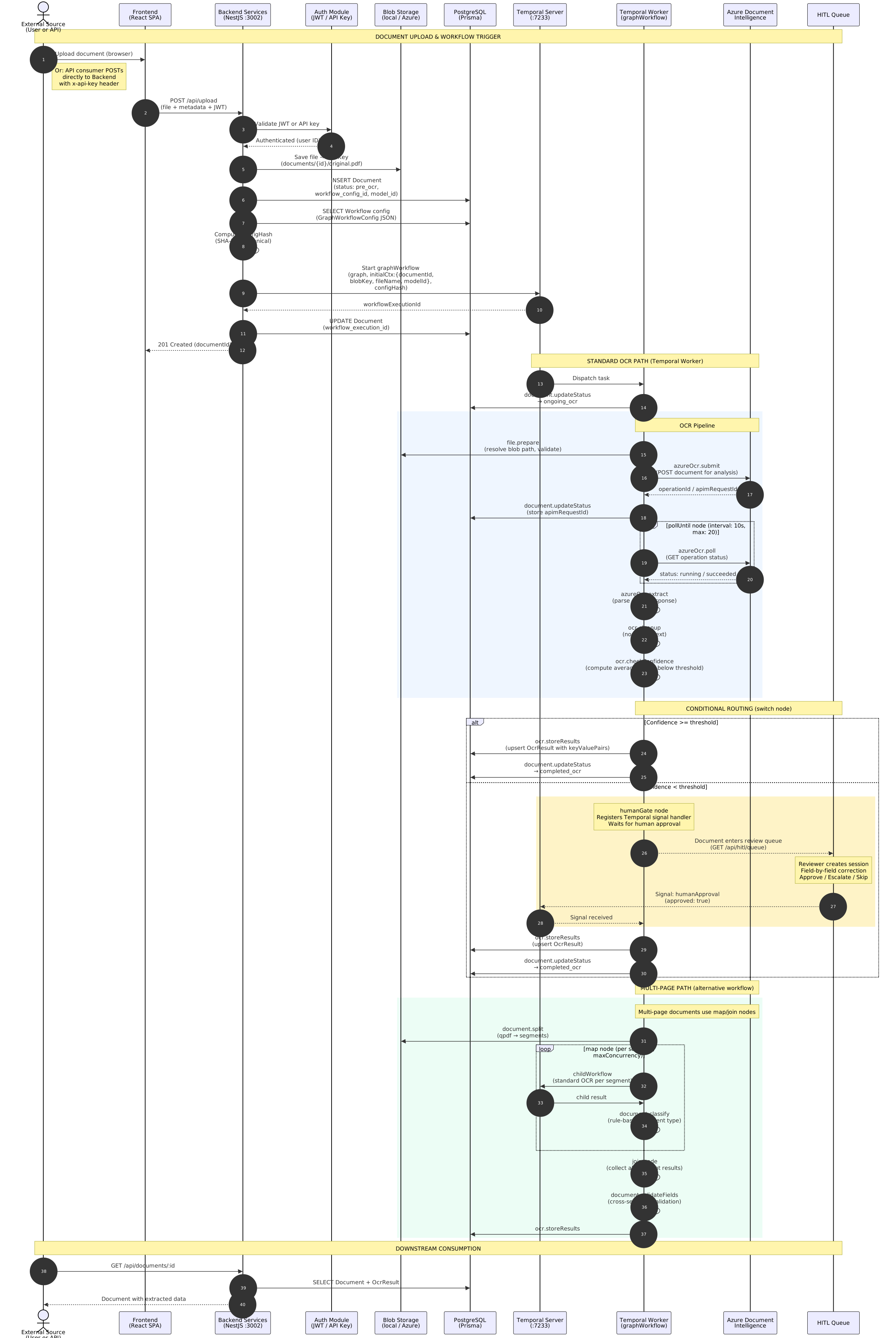
Document Ingestion Flow
Sequence diagram of the full document upload, processing, and extraction pipeline

Deployment Topology
OpenShift cluster layout, ingress, services, and external dependencies
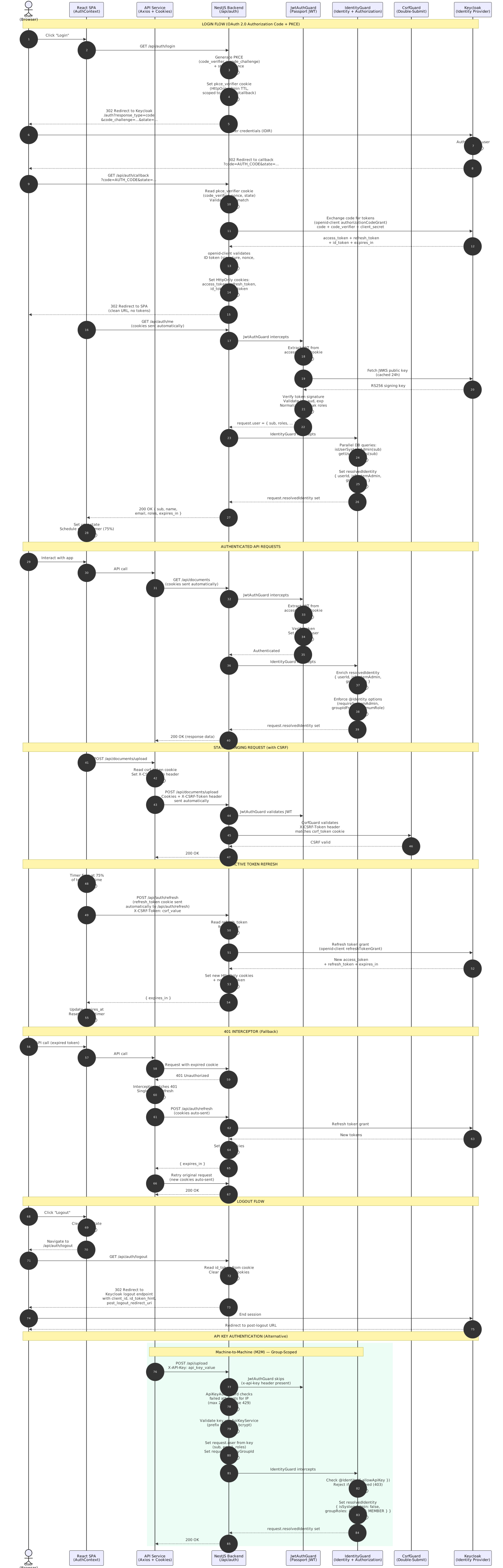
Authentication Flow
OAuth 2.0 Authorization Code + PKCE sequence — login, token refresh, and logout
Interactive Viewer
+ / - Zoom
0 Reset
W Fit Width
F Fullscreen
Esc Exit Fullscreen
Diagram Descriptions
System Overview
The top-level architecture diagram showing:
- Frontend: React SPA served via OpenShift
- Backend Services: REST API and business logic layer
- Temporal: Workflow orchestration engine
- Storage: Database and object storage connections
- External integrations: AI services and downstream APIs
Document Ingestion Flow
End-to-end sequence showing:
- Upload from external source (user or API consumer)
- Frontend relay to backend REST API
- Workflow initiation in Temporal
- Activity execution: extraction, classification, storage
- Status callbacks and result delivery
Deployment Topology
Infrastructure layout showing:
- OpenShift cluster boundaries and namespaces
- Ingress routing and service mesh
- Internet-facing vs internal traffic paths
- External service dependencies and endpoints
Temporal Worker Internals
Worker process structure showing:
worker.tsentrypoint and startup sequence- gRPC connection to Temporal server on port 7233
- Activity and workflow registration
- Task queue polling and execution model
Authentication Flow
OAuth 2.0 sequence showing:
- Login with PKCE and state parameter
- Authorization code exchange via openid-client
- Proactive token refresh and 401 interceptor
- API key authentication alternative
- Logout and session termination
Using SVG Diagrams
Why SVG?
SVG diagrams are vector-based, meaning they scale infinitely without losing quality. You can zoom in to see fine details, search text within the diagram, and download for use in presentations or documentation.
SVG diagrams are vector-based, meaning they scale infinitely without losing quality. You can zoom in to see fine details, search text within the diagram, and download for use in presentations or documentation.
Tips for Working with SVG Diagrams
In Browser
- Use Ctrl+F to search for text within the diagram
- Right-click → "Open image in new tab" for native zoom
- Ctrl+Scroll to zoom in the viewer
Downloaded
- Open in VS Code for source editing
- Use Inkscape for advanced modifications
- Import into Figma or Miro for presentations
Source Files
Diagrams are authored as Mermaid files in
Diagrams are authored as Mermaid files in
_diagrams/ and compiled to SVG during the build. To update a diagram, edit the corresponding .mmd file and run ./build.sh.