
Authentication & Authorization Architecture
This page documents the authentication and authorization system used by the Document Intelligence Platform. The implementation follows the OAuth 2.0 Authorization Code Flow with PKCE, using Keycloak as the identity provider and a confidential NestJS backend as the OAuth client.
The platform supports two authentication methods: Bearer Tokens (Keycloak SSO) for user-facing applications and API Keys for machine-to-machine integrations. Both are enforced globally via NestJS guards.
Architecture Overview
The authentication system is split across the backend (NestJS) and frontend (React SPA), with Keycloak handling identity management.
Backend (Confidential Client)
- Holds the
client_secret— never exposed to the browser - Uses
openid-client(v6.x) for OIDC discovery, code exchange, and token refresh - Uses
passport-jwtfor cookie-first JWT validation (Bearer header fallback) - PKCE state stored in HttpOnly cookie (2-minute TTL)
- Tokens set as HttpOnly, Secure, SameSite=Lax cookies — never exposed to JavaScript
- CSRF protection via double-submit cookie pattern (
CsrfGuard)
Frontend (Stateless SPA)
- No OIDC client library — relies entirely on the backend
- Cookie-based authentication — tokens managed by the browser automatically
- User profile loaded from
GET /api/auth/meendpoint on mount - Axios 401 interceptor with single-flight cookie refresh
- CSRF token read from non-HttpOnly cookie and sent as
X-CSRF-Tokenheader
Authentication Flow Diagram
The following sequence diagram shows the complete authentication lifecycle — from login through to token refresh and logout.
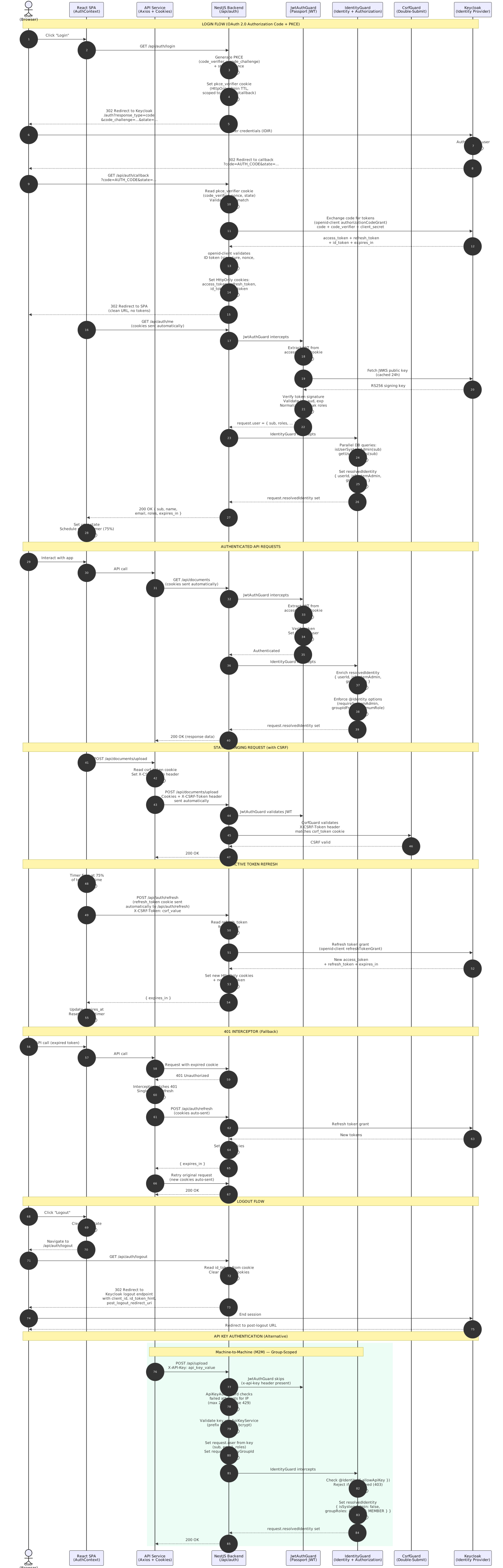
View this diagram in full in the interactive diagram viewer.
OAuth 2.0 Login Flow
The login process uses the Authorization Code Flow with PKCE and a confidential client. The backend orchestrates all interactions with Keycloak — the browser never sees the client secret, authorization code exchange, or PKCE verifier.
Step-by-Step
| Step | Actor | Action |
|---|---|---|
| 1 | User | Clicks "Login" — browser navigates to GET /api/auth/login |
| 2 | Backend | Generates PKCE pair (code_verifier + code_challenge), random state, and nonce via openid-client |
| 3 | Backend | Stores PKCE state (code_verifier, state, nonce) in an HttpOnly cookie (2-minute TTL, path /api/auth/callback) |
| 4 | Backend | Redirects browser to Keycloak authorization endpoint with code_challenge, state, nonce, and scope=openid profile email |
| 5 | User | Authenticates at Keycloak (e.g., IDIR credentials) |
| 6 | Keycloak | Redirects to GET /api/auth/callback?code=...&state=... |
| 7 | Backend | Validates state, retrieves code_verifier and nonce from PKCE cookie |
| 8 | Backend | Exchanges authorization code for tokens via openid-client.authorizationCodeGrant() — includes code_verifier and client_secret |
| 9 | Backend | The openid-client library validates the ID token (signature via JWKS, nonce, issuer, audience) |
| 10 | Backend | Sets HttpOnly cookies: access_token (path /), refresh_token (path /api/auth/refresh, 30d), id_token (path /api/auth), and a non-HttpOnly csrf_token cookie |
| 11 | Backend | Clears the PKCE cookie and redirects browser to FRONTEND_URL (clean URL, no query parameters) |
| 12 | SPA | On mount, calls GET /api/auth/me (with credentials) to load user profile and session info |
/api/auth/me endpoint after mount.
Token Refresh Strategy
The platform uses a three-layer approach to keep sessions alive without requiring the user to re-authenticate.
1. Proactive Timer
A setTimeout is scheduled at 75% of the access token's lifetime (minimum 10 seconds). When it fires, the SPA calls POST /api/auth/refresh. Cookies are refreshed automatically by the server response, and the timer is rescheduled.
2. Tab Visibility Listener
When the user returns to the tab (via a visibilitychange event), the SPA checks if the access token has less than 60 seconds remaining. If so, it triggers an immediate refresh to avoid making API calls with an about-to-expire token.
3. Axios 401 Interceptor
If a request returns 401 Unauthorized, the interceptor attempts a single-flight refresh via POST /api/auth/refresh (cookies sent automatically), retries the original request, and only logs the user out if refresh fails.
Refresh Endpoint
POST /api/auth/refresh
Cookie: refresh_token=eyJhbGciOi...
X-CSRF-Token: abc123...
The backend reads the refresh_token from the HttpOnly cookie, exchanges it with Keycloak via openid-client.refreshTokenGrant(), and sets updated auth cookies in the response. Returns { "expires_in": 300 } in the body.
Token Validation
All API requests (except routes marked @Public()) are validated by a global Passport JWT guard. The JWT strategy extracts tokens from HttpOnly cookies first, with a Bearer header fallback for API clients.
Guard Execution Order
Five guards are registered globally via NestJS APP_GUARD. They execute in this order on every request:
| Order | Guard | Responsibility |
|---|---|---|
| 1 | ThrottlerGuard |
Enforces per-IP rate limits. Defaults: 100 requests/minute globally, 5–10 requests/minute on auth endpoints. All limits are env-configurable via auth.config.ts. Returns 429 when exceeded. |
| 2 | JwtAuthGuard |
Extends Passport AuthGuard('jwt'). Skips @Public() routes. Defers to API key guard if x-api-key header present. Otherwise validates token via KeycloakJwtStrategy (cookie-first, Bearer fallback). |
| 3 | ApiKeyAuthGuard |
Validates X-API-Key header when present. Skips if user already authenticated via JWT. Tracks failed validation attempts per IP — after the configured limit (default: 20 failures/minute), blocks with 429 Too Many Requests before reaching the expensive bcrypt comparison. All thresholds are env-configurable. |
| 4 | IdentityGuard |
Reads @Identity() decorator metadata to resolve and enrich the requestor's identity. For JWT requests, runs parallel DB queries (isUserSystemAdmin + getUsersGroups) and attaches resolvedIdentity with userId, isSystemAdmin, and groupRoles. For API key requests, rejects unless @Identity({ allowApiKey: true }) is set, then populates groupRoles from the key's group scope. Enforces requireSystemAdmin, groupIdFrom membership, and minimumRole checks declaratively. Throws 403 on authorization failure or 401 on unauthenticated access to non-public endpoints. |
| 5 | CsrfGuard |
Validates CSRF double-submit token on state-changing requests (POST, PUT, DELETE, PATCH) when the user is authenticated via cookies. Skips Bearer and API-key authenticated requests. |
Keycloak JWT Strategy
The KeycloakJwtStrategy (Passport strategy) handles token validation:
- Key Provider:
passport-jwtwithsecretOrKeyProviderusingjwks-rsa— automatically fetches and caches Keycloak's RS256 public keys from the JWKS endpoint - Token Extraction: Cookie-first (
req.cookies.access_token), withAuthorization: Bearer {token}header as fallback for API clients - Validation: RS256 signature, issuer, audience, expiration
IdentityGuard using database-backed roles: is_system_admin (boolean on the User table) and GroupRole (ADMIN | MEMBER, stored in the UserGroup table). See Authorization below.
Authorization Model
Authorization uses a two-tier database-backed role system, not Keycloak JWT roles:
System Admin (is_system_admin)
A boolean flag on the User database table. System admins bypass all group membership checks and can access all resources. Checked via @Identity({ requireSystemAdmin: true }) or through the pre-populated resolvedIdentity.isSystemAdmin flag.
Group Role (GroupRole)
A per-group role stored in the UserGroup join table. Two levels: MEMBER (default) and ADMIN. Checked via @Identity({ groupIdFrom: ..., minimumRole: GroupRole.ADMIN }) or through resolvedIdentity.groupRoles. API keys are always assigned MEMBER role within their scoped group.
Decorator Composition Rules
The guard chain runs globally in this order: JwtAuthGuard → ApiKeyAuthGuard → IdentityGuard → CsrfGuard. The @Identity() decorator controls how the IdentityGuard resolves and enforces authorization. Follow these rules when protecting endpoints.
Available Decorators
| Decorator | Purpose | Runtime Effect |
|---|---|---|
@Public() |
Unauthenticated access | JwtAuthGuard returns true immediately — all downstream guards become no-ops |
@Identity() |
Identity resolution + authorization | IdentityGuard enriches request.resolvedIdentity with isSystemAdmin and groupRoles (parallel DB queries for JWT, no queries for API key). Enforces requireSystemAdmin, groupIdFrom membership, and minimumRole checks. Also adds Swagger @ApiBearerAuth metadata. Without this decorator, IdentityGuard still sets a base identity but skips enrichment and enforcement. |
@Identity({ allowApiKey: true }) |
Allow API key authentication | Tells IdentityGuard to accept API-key-authenticated requests. Also adds Swagger @ApiSecurity("api-key") metadata. Without this flag, API key requests receive 403 Forbidden. |
@Identity({ requireSystemAdmin: true }) |
System admin only | IdentityGuard throws 403 if the resolved identity is not a system admin. API keys always fail this check (isSystemAdmin is always false for API keys). |
@Identity({ groupIdFrom: { param: "groupId" }, minimumRole: GroupRole.ADMIN }) |
Group-scoped with role check | IdentityGuard extracts the group ID from the specified request location (param, query, or body), verifies the identity is a member of that group, and checks that their role meets the minimum. System admins bypass these checks. |
Valid Combinations
Standard JWT-protected (most common)
@Identity()
@Get("documents")
listDocuments() {}
Requires valid JWT. API keys rejected. Identity enriched with isSystemAdmin and groupRoles for downstream use.
Dual auth — JWT or API key
@Identity({ allowApiKey: true })
@Post("upload")
uploadDocument() {}
Accepts either JWT or X-API-Key. If neither → 401. CSRF automatically exempted for API key and Bearer requests.
System admin only
@Identity({ requireSystemAdmin: true })
@Delete("admin/users/:id")
deleteUser() {}
Requires valid JWT and system-admin status. API keys always fail this check. Non-admins get 403.
Group-scoped with minimum role
@Identity({
  groupIdFrom: { param: "groupId" },
  minimumRole: GroupRole.ADMIN,
})
@Put(":groupId/settings")
updateGroupSettings() {}
Extracts groupId from the route param, verifies membership, and requires at least ADMIN role within that group. System admins bypass these checks.
Invalid / Dangerous Combinations
@Public()+@Identity()—@Public()short-circuits the guard chain; the identity decorator has no effect@Identity({ requireSystemAdmin: true, allowApiKey: true })— API keys always haveisSystemAdmin = false, so this combination always rejects API key requests
Decision Flowchart
- Is this an auth flow endpoint (login, callback, refresh, logout)? →
@Public() - Does this endpoint need machine-to-machine access? →
@Identity({ allowApiKey: true }) - Does this endpoint require system-admin access? →
@Identity({ requireSystemAdmin: true }) - Does this endpoint need group-scoped authorization? →
@Identity({ groupIdFrom: { param: "groupId" } }) - Does it also need a minimum role? → Add
minimumRole: GroupRole.ADMINto the options - Standard authenticated endpoint? →
@Identity()
API Key Authentication
For machine-to-machine (M2M) integrations, routes decorated with @Identity({ allowApiKey: true }) accept an API key via the X-API-Key header as an alternative to Bearer tokens.
GET /api/documents
X-API-Key: your-api-key-here
How It Works
- API keys are generated and managed through the platform Settings page
- Each group can have one active key at a time — keys are scoped to the group, not individual users
- Keys are validated by the
ApiKeyAuthGuardviaApiKeyService - On validation,
request.apiKeyGroupIdis set to the key's owning group ID, andrequest.useris populated with roles inherited from the creating user's JWT at key creation time - The
IdentityGuardthen setsrequest.resolvedIdentity = { isSystemAdmin: false, groupRoles: { [groupId]: MEMBER } }for downstream authorization — no database queries required - Regenerating a key creates a fresh key for the same group
When to Use
- Automated pipelines and CI/CD
- Service-to-service integrations
- Scripts and CLI tools
- Any headless (non-browser) consumer
Group-Scoped Authorization
All primary resources (documents, workflows, OCR results, HITL sessions, etc.) are scoped to a group via a group_id foreign key. The IdentityGuard resolves the requestor's identity, and service-layer helpers enforce group-level access control.
Identity Resolution
The IdentityGuard runs after authentication and attaches a ResolvedIdentity to request.resolvedIdentity. The identity is enriched with isSystemAdmin and groupRoles — a map of group IDs to the identity's role within each group:
| Auth Method | Identity Fields | How Resolved |
|---|---|---|
| JWT (Keycloak SSO) | { userId, isSystemAdmin, groupRoles } |
Two parallel DB queries: isUserSystemAdmin(userId) and getUsersGroups(userId). No additional queries needed downstream. |
| API Key | { isSystemAdmin: false, groupRoles: { [groupId]: MEMBER } } |
Key is group-scoped — populated directly from request.apiKeyGroupId. No database queries required. |
Authorization Helpers
Two shared helpers in identity.helpers.ts are used by controllers to enforce group access:
getIdentityGroupIds(identity)
Returns the list of group IDs the identity can access, or undefined for system-admins (unrestricted access). Used by list/query endpoints to filter results to the requestor's groups. No additional database queries — uses pre-populated groupRoles.
- API key → keys of
identity.groupRoles - System admin (
isSystemAdmin: true) →undefined(no filter) - Regular user → keys of
identity.groupRoles
identityCanAccessGroup(identity, groupId, minimumRole?)
Asserts that the identity can access a specific group with an optional minimum role check. Throws HTTP exceptions on failure. Used by single-resource endpoints (get, update, delete) after fetching the resource's group_id. No additional database queries — uses pre-populated groupRoles.
groupId === null→404 Not Found(orphaned record)- No identity →
403 Forbidden - System admin (
isSystemAdmin: true) → always allowed - Group not in
groupRoles→403 Forbidden - Role below
minimumRole→403 Forbidden
Authorization
Authorization is enforced declaratively through the @Identity() decorator and the IdentityGuard. The old @Roles() decorator and RolesGuard have been removed.
How Authorization Is Applied
// System admin only
@Identity({ requireSystemAdmin: true })
@Post("groups")
createGroup() { ... }

// Group-scoped with minimum role
@Identity({ groupIdFrom: { param: "groupId" }, minimumRole: GroupRole.ADMIN })
@Put(":groupId/settings")
updateSettings() { ... }

// Allow API key access
@Identity({ allowApiKey: true })
@Post("upload")
uploadDocument() { ... }requireSystemAdminchecksresolvedIdentity.isSystemAdmin— API keys always fail this checkgroupIdFromextracts the group ID from a route param, query param, or request body field, then verifies membership viaresolvedIdentity.groupRolesminimumRolechecks that the identity's role within the group meets the minimum (MEMBER<ADMIN)- System admins bypass
groupIdFromandminimumRolechecks - If no
@Identity()decorator is present, the guard still sets a base identity but performs no authorization enforcement
Backend Module Structure
The auth system is contained within apps/backend-services/src/auth/ with the following file structure:
| File | Purpose |
|---|---|
auth.module.ts | Module definition — registers global guards, imports PassportModule |
auth.controller.ts | HTTP endpoints: /login, /callback, /me, /refresh, /logout |
auth.service.ts | OAuth orchestrator — OIDC discovery, PKCE, code exchange, token refresh via openid-client |
cookie-auth.utils.ts | Centralized cookie configuration — setAuthCookies(), clearAuthCookies(), CSRF token generation |
csrf.guard.ts | Global CSRF guard — double-submit cookie validation for state-changing requests |
keycloak-jwt.strategy.ts | Passport JWT strategy — cookie-first extraction, JWKS validation |
jwt-auth.guard.ts | Global JWT guard — extends AuthGuard('jwt'), handles @Public() bypass, defers to API key guard when x-api-key header present |
api-key-auth.guard.ts | API key validation guard |
identity.decorator.ts | @Identity() — declares authentication and authorization requirements (requireSystemAdmin, groupIdFrom, minimumRole, allowApiKey); also adds Swagger metadata |
identity.guard.ts | Identity resolution and authorization guard — enriches request.resolvedIdentity with isSystemAdmin and groupRoles, then enforces @Identity() options |
identity.helpers.ts | Authorization helpers — getIdentityGroupIds() and identityCanAccessGroup() for group-scoped access control (no DB queries, uses pre-populated identity) |
public.decorator.ts | @Public() — marks routes as unauthenticated |
types.ts | User and ResolvedIdentity interfaces, plus Express Request augmentation for apiKeyGroupId and resolvedIdentity |
dto/*.ts | Validated DTOs for all auth endpoints (class-validator) |
Frontend Auth Architecture
The React SPA uses a single AuthContext provider that encapsulates all authentication logic. No OIDC client library is used — the frontend relies entirely on the backend for OAuth interactions.
AuthProvider Responsibilities
| Feature | Description |
|---|---|
| Authentication | Cookie-based — HttpOnly cookies are sent automatically by the browser on all same-origin requests |
| Session Check | On mount, calls GET /api/auth/me with credentials — loads user profile if authenticated, shows login if not |
| OAuth Redirect Handling | After login callback, the backend redirects to a clean FRONTEND_URL — SPA mounts and calls /me |
| Profile Data | Loaded from /api/auth/me response: sub, name, email, preferred_username, roles |
| Token Refresh | Calls POST /api/auth/refresh — cookies are refreshed by the server response |
| CSRF Protection | Reads non-HttpOnly csrf_token cookie and sends it as X-CSRF-Token header on POST/PUT/DELETE requests |
API Service (Axios)
The apiService wraps Axios with authentication-aware interceptors:
- Request interceptor: Reads the
csrf_tokencookie and attaches it as theX-CSRF-Tokenheader on POST, PUT, and DELETE requests. All requests includewithCredentials: trueso cookies are sent automatically. - Response interceptor: On 401, triggers a single-flight refresh via
POST /api/auth/refresh(cookies sent automatically), retries the original request, logs out if refresh fails
Security Mechanisms
PKCE (Proof Key for Code Exchange)
The backend generates a code_verifier (random string) and sends its SHA-256 hash (code_challenge) to Keycloak. On callback, the original code_verifier is sent with the code exchange — Keycloak verifies the hash matches, preventing authorization code interception attacks.
Nonce Validation
A random nonce is included in the authorization request and embedded in the ID token by Keycloak. The openid-client library validates that the ID token nonce matches the expected value, ensuring the token was issued for this specific request.
JWKS Signature Verification
All access tokens (from cookies or Bearer headers) are verified using Keycloak's RS256 public keys fetched from the JWKS endpoint via openid-client.
HttpOnly Cookie Storage
Tokens are stored in HttpOnly, Secure, SameSite=Lax cookies. JavaScript cannot access them, eliminating XSS-based token theft. The refresh_token cookie is scoped to /api/auth/refresh to minimize exposure.
CSRF Double-Submit Cookie
A random CSRF token is set as a non-HttpOnly cookie and must be echoed in the X-CSRF-Token header on state-changing requests. The global CsrfGuard validates this for all cookie-authenticated POST/PUT/DELETE/PATCH requests.
Rate Limiting
All endpoints are protected by @nestjs/throttler with env-configurable limits (defaults: 100 requests per minute per IP globally, /api/auth/refresh at 5/min, /api/auth/login, /api/auth/callback, /api/auth/logout at 10/min, API key failed-attempt throttling at 20 failures/min/IP). All values can be overridden via environment variables — see auth.config.ts for the full list. Exceeding limits returns 429 Too Many Requests.
Security Headers (Helmet)
The helmet middleware sets HTTP security headers on all backend responses: Strict-Transport-Security (HSTS, 1 year), X-Frame-Options: DENY (clickjacking prevention), X-Content-Type-Options: nosniff, Referrer-Policy: strict-origin-when-cross-origin, Content-Security-Policy, and removes X-Powered-By. The frontend nginx config also sets equivalent security headers.
Configuration
The following environment variables configure the authentication system:
| Variable | Required | Description |
|---|---|---|
SSO_AUTH_SERVER_URL | Yes | Keycloak base URL (e.g., https://sso.example.com/auth) or full OIDC endpoint (https://sso.example.com/realms/my-realm/protocol/openid-connect) |
SSO_REALM | Yes | Keycloak realm name (e.g., my-realm). Used with the base URL format to construct the issuer: {SSO_AUTH_SERVER_URL}/realms/{SSO_REALM} |
SSO_CLIENT_ID | Yes | OAuth client ID registered in Keycloak |
SSO_CLIENT_SECRET | Yes | Confidential client secret (server-side only) |
SSO_REDIRECT_URI | Yes | Callback URL (e.g., https://your-host/api/auth/callback) |
FRONTEND_URL | Yes | SPA base URL for post-auth redirect |
SSO_POST_LOGOUT_REDIRECT_URI | No | URL to redirect to after Keycloak logout |
NODE_ENV | No | Controls cookie Secure flag — when development or test, cookies are not marked Secure (allows HTTP in local dev) |
API Endpoints
Auth flow endpoints are under /api/auth/. The flow endpoints (/login, /callback, /refresh, /logout) are marked @Public() (no bearer token required). The /me endpoint requires a valid JWT.
| Method | Endpoint | Description |
|---|---|---|
GET |
/api/auth/login |
Redirects browser to Keycloak with PKCE + state + nonce |
GET |
/api/auth/callback |
Handles Keycloak redirect, exchanges code for tokens, sets auth cookies, redirects to SPA |
GET |
/api/auth/me |
Returns authenticated user profile — sub, name, email, roles, expires_in (requires valid access_token cookie or Bearer) |
POST |
/api/auth/refresh |
Reads refresh_token from HttpOnly cookie, refreshes with Keycloak, sets updated cookies. Returns { "expires_in": ... } |
GET |
/api/auth/logout |
Reads id_token from cookie, clears all auth cookies, redirects to Keycloak logout endpoint with client_id, id_token_hint, and post_logout_redirect_uri |
Technology Stack
Backend Libraries
| Library | Purpose |
|---|---|
openid-client (v6.x) | OpenID-certified RP — OIDC discovery, authorization URL construction, code exchange, token refresh, ID token validation |
jwks-rsa (v3.x) | Fetches and caches Keycloak's RS256 public signing keys from the JWKS endpoint for per-request JWT validation via Passport |
@nestjs/passport | Passport integration for NestJS guards and strategies |
passport-jwt | JWT extraction (cookie-first with Bearer fallback) and validation strategy |
@nestjs/throttler | Global and per-route rate limiting — protects against brute-force, credential stuffing, and DoS attacks |
helmet | HTTP security headers — HSTS, X-Frame-Options, X-Content-Type-Options, Referrer-Policy, CSP, removes X-Powered-By |
cookie-parser | Express middleware for parsing cookies from incoming requests |
class-validator | DTO validation for all auth request/response shapes |
Frontend Libraries
| Library | Purpose |
|---|---|
axios | HTTP client with withCredentials: true for cookie transport and CSRF header injection |
react | AuthContext provider for global authentication state |
Critique & Improvement Recommendations
The current implementation is functional and follows industry-standard patterns. The following areas have been identified as opportunities for further hardening, scalability, and operational improvements.
Progress. Items 1, 2, 5, and 6 have been resolved with the cookie-based auth migration, rate limiting implementation, and security headers. The remaining items are improvements for maintainability and operational excellence.
1. In-Memory Session Store Is Not Horizontally Scalable — RESOLVED
Resolved: The AuthSessionStore has been removed. PKCE state is now stored in an HttpOnly cookie (2-minute TTL, scoped to /api/auth/callback). Tokens are set directly as HttpOnly cookies in the callback response. The backend is fully stateless and can be horizontally scaled without sticky sessions.
2. Token Storage in localStorage Is Vulnerable to XSS — RESOLVED
Resolved: Tokens are now stored in HttpOnly, Secure, SameSite=Lax cookies. JavaScript cannot access tokens at all. CSRF protection is implemented via a double-submit cookie pattern with the global CsrfGuard. The SPA never handles raw tokens — it only interacts with the /api/auth/me endpoint for profile data.
3. No Token Revocation Check on the Backend
Issue: Bearer token validation only checks the JWT signature, issuer, audience, and expiration. If a token is revoked in Keycloak (e.g., user account disabled, admin-initiated session termination), the token remains valid until it naturally expires. This is inherent to stateless JWT validation.
Recommendation: Implement token introspection for sensitive operations. Use Keycloak's /protocol/openid-connect/token/introspect endpoint to check if a token is still active. This can be applied selectively (e.g., for admin operations, write operations) to avoid the performance overhead on every request. Alternatively, use short-lived access tokens (e.g., 5 minutes) combined with refresh token rotation to reduce the window of exposure.
4. Duplicate Decorator Definitions — RESOLVED
Resolved: The old @ApiKeyAuth(), @KeycloakSSOAuth(), and @Roles() decorators along with the RolesGuard have been removed. All authentication and authorization requirements are now declared through a single @Identity() decorator in src/auth/identity.decorator.ts, which handles both runtime metadata and Swagger annotations.
5. No Rate Limiting on Auth Endpoints — RESOLVED
Resolved: Global rate limiting is now enforced via @nestjs/throttler. All limits are env-configurable with sensible defaults: 100 requests per minute per IP globally, 5 requests/minute for /api/auth/refresh, and 10 requests/minute for /api/auth/login, /api/auth/callback, and /api/auth/logout. When limits are exceeded, the server returns HTTP 429 Too Many Requests with Retry-After headers. See auth.config.ts for the complete list of environment variables.
6. No Security Headers (Helmet) — RESOLVED
Resolved: The helmet middleware (v8.x) is now registered in main.ts before routes are mounted, setting HTTP security headers on all backend responses: Strict-Transport-Security (HSTS, max-age 1 year with includeSubDomains), X-Frame-Options: DENY, X-Content-Type-Options: nosniff, Referrer-Policy: strict-origin-when-cross-origin, and Content-Security-Policy (configured to allow Swagger UI). The X-Powered-By header is removed. The frontend nginx config also sets equivalent security headers.
7. No Structured Logging for Authentication Events
Issue: Authentication events (successful login, failed refresh, token validation failure, logout) are logged using the default NestJS logger without structured metadata. This makes it difficult to audit authentication activity, detect anomalies, or trace issues in production.
Recommendation: Emit structured JSON log entries for all auth events with consistent fields: event_type, user_sub, client_ip, timestamp, result (success/failure), and reason (for failures). Integrate with a centralized logging system (e.g., ELK, Splunk) for monitoring and alerting.
8. User Type Uses Loose Index Signature
Issue: The User type in auth/types.ts includes [key: string]: unknown, allowing arbitrary JWT claims to pass through. While pragmatic, this weakens type safety downstream — consumers of request.user may access properties that don't exist without TypeScript catching the error.
Recommendation: Define explicit optional fields for known Keycloak claims (e.g., preferred_username, given_name, family_name, realm_access, resource_access) and remove the index signature. If pass-through of unknown claims is truly needed, consider using a separate rawClaims field.
9. No Automated Auth Integration Tests
Issue: While unit tests exist for individual components, there are no end-to-end integration tests that exercise the full OAuth flow (login → callback → result → API call → refresh → logout). Auth regressions may only be caught in manual testing or production.
Recommendation: Create integration tests using a Keycloak test container (e.g., testcontainers with the Keycloak Docker image). Test the full flow including: successful login, expired token refresh, revoked token handling, rate limit enforcement, and role-based access denial.
10. No Resource-Level Authorization (IDOR) — RESOLVED
Resolved: Group-scoped access control is now enforced across all primary resource endpoints. The IdentityGuard resolves the requestor's identity (JWT user ID or API key group ID), and controllers use the shared helpers getIdentityGroupIds() and identityCanAccessGroup() from identity.helpers.ts to filter list queries by group membership and validate single-resource access against the resource's group_id. System-admins bypass group filtering. See the Group-Scoped Authorization section for details.
11. No Rate Limiting on API Key Validation Path — RESOLVED
Resolved: The ApiKeyAuthGuard now tracks failed API key validation attempts per IP address in-memory. After the configured limit (default: 20 failed attempts) within the configured window (default: 60 seconds), further attempts from the same IP are blocked with 429 Too Many Requests before reaching the expensive database query and bcrypt comparison. The counter resets on successful validation or when the time window expires. Stale records are swept at a configurable interval (default: 60 seconds) to prevent memory leaks. All thresholds are env-configurable — see auth.config.ts.